
PlaylistSync - Playlist Backup2.1.4 - Get APK
You'll be able to download in few seconds.
Publisher Description
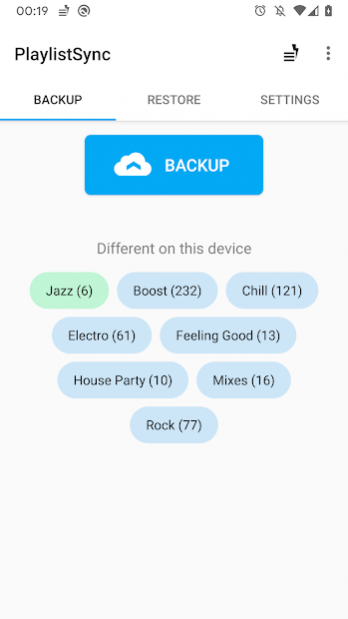
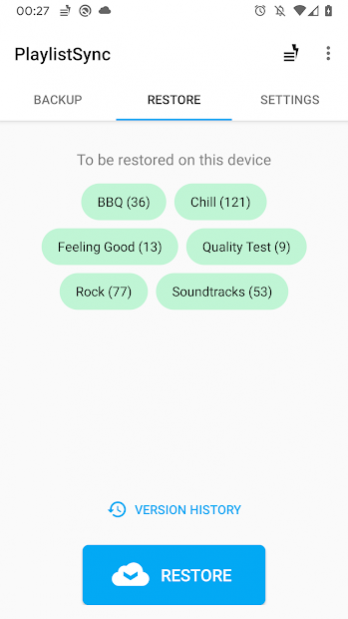
★ Backup your Android playlists online
★ Restore them on any Android devices
Download our (beta) desktop app for .m3u playlists syncing! https://playlistsync.web.app
Warning
- This app only backups your playlists,
not your audio files !
(so that a backup can be performed in a few seconds)
- Your audio files must have
the same file names
on your different devices.
- Doesn't work with Google Play (unless you use our free app Playlist Manager Pro, more info in-app)
Permissions
- Sign in with Google to create a PlaylistSync account.
- Internet: needed to backup your playlists.
- Read external storage: needed to access your playlists.
- Write external storage: needed to restore your playlists.
FAQ
I can't see my playlists !
Some music players use their own playlists systems instead of the default one from Android, so PlaylistSync won't support them (Playlist Backup may help you with that).
Incompatible :
Poweramp, Google Play Music, RealPlayer, etc.
Compatible :
PlayerPro, Rocket Player, jetAudio, etc.
How should my music files be named ?
If every single music file has a different name, it's fine. (For example : you shouldn't have multiple "audio01.mp3" in different folders)
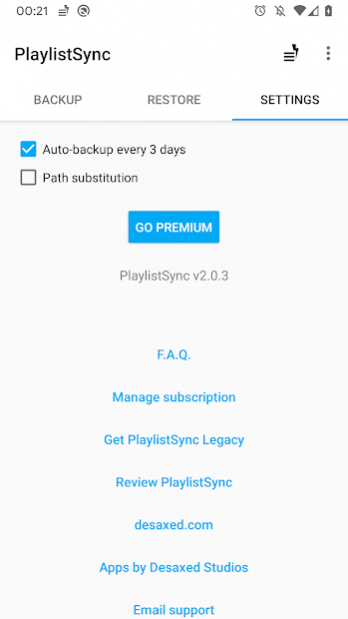
Else, you'll maybe have to use the Path substitution option to make sure PlaylistSync finds the correct audio files on different devices.
Both following condition should be fulfilled, else this option is useless :
- You have multiple audio files with the same name.
- You have devices that store you music differently, and you would like to sync playlists between them (
/mnt/sdcard/Music/somefile.mp3
and on the other device :
/storage/emulated/0/Music/somefile.mp3
)
Additional information
This app doesn't use the .M3U format anymore, but please contact us if you're interested in M3U import/exports!
About PlaylistSync - Playlist Backup
The company that develops PlaylistSync - Playlist Backup is Desaxed Studio. The latest version released by its developer is 2.1.4.
To install PlaylistSync - Playlist Backup on your Android device, just click the green Continue To App button above to start the installation process. The app is listed on our website since 2020-10-22 and was downloaded 0 times. We have already checked if the download link is safe, however for your own protection we recommend that you scan the downloaded app with your antivirus. Your antivirus may detect the PlaylistSync - Playlist Backup as malware as malware if the download link to com.desaxed.playlistsync is broken.
How to install PlaylistSync - Playlist Backup on your Android device:
- Click on the Continue To App button on our website. This will redirect you to Google Play.
- Once the PlaylistSync - Playlist Backup is shown in the Google Play listing of your Android device, you can start its download and installation. Tap on the Install button located below the search bar and to the right of the app icon.
- A pop-up window with the permissions required by PlaylistSync - Playlist Backup will be shown. Click on Accept to continue the process.
- PlaylistSync - Playlist Backup will be downloaded onto your device, displaying a progress. Once the download completes, the installation will start and you'll get a notification after the installation is finished.
Program Details
System requirements
Download information
Pricing
Version History
version 2.1.4
posted on 2020-10-22
You can now see a per-song diff of each playlists!
version 2.1.2
posted on 2020-06-02
The Android app now displays differences between the selection version from history and the last backup.
The PlaylistSync Desktop app is now out of Beta!
version 2.1.0
posted on 2020-03-08
The PlaylistSync Desktop app now allows you to export and import .m3u files on any computer!
version 2.0.5
posted on 2020-02-29
Rewritten from scratch, PlaylistSync is now faster and easier to use! With new features like Automatic Backups and Version History!
version 1.3.2
posted on 2019-11-23
Android 8.1 Oreo update!
Fix Google Drive issue
UI enhancements
version 1.2.1
posted on 2016-05-28
Updated for Android 6.0
Disclaimer
External Download
We do not host PlaylistSync - Playlist Backup on our servers. We did not scan it for viruses, adware, spyware or other type of malware. This app is hosted by Galad and passed their terms and conditions to be listed there. We recommend caution when installing it.
The APK Download link for PlaylistSync - Playlist Backup is provided to you by apps112.com without any warranties, representations or guarantees of any kind, so access it at your own risk.
If you have questions regarding this particular app contact the publisher directly. For questions about the functionalities of apps112.com contact us.
